Fitbit Air Cadence Lock and Google Health App Design Failures
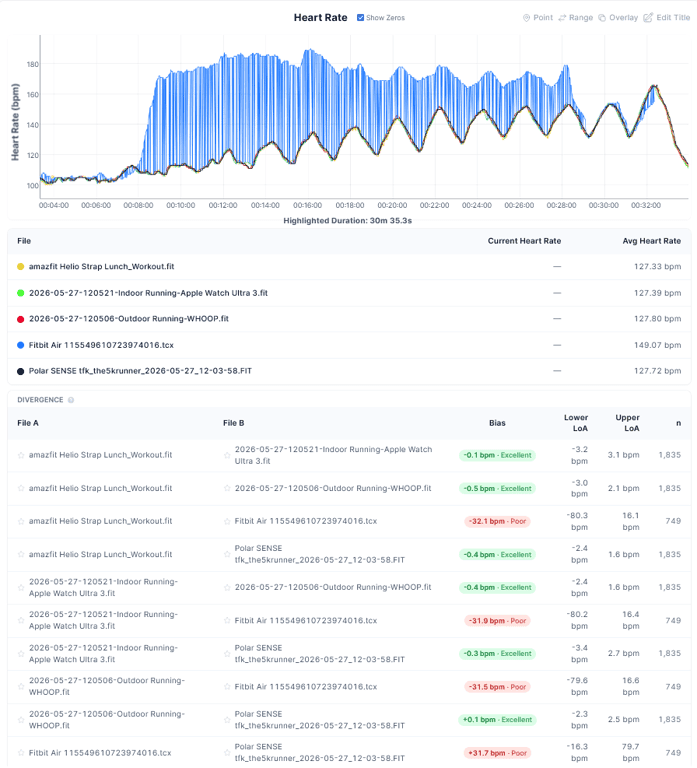
The Fitbit Air has a serious optical sensor problem that endurance athletes need to know about before trusting any heart rate data from indoor sessions. During a treadmill interval workout, the wrist-based PPG sensor locked onto running cadence instead of true cardiovascular output, spitting out an average of roughly 157 bpm against a chest strap reference sitting steady at 131-132 bpm. That is a 25 bpm error. For context, 131 bpm sits comfortably in Zone 2 for most trained runners, while 157 bpm lands squarely in Zone 4. Those are not the same training session.
Cadence Lock: What It Is and Why It Wrecks Your Data
Cadence lock happens when a wrist optical sensor, which reads blood volume changes through light rather than electrical impulses like a chest ECG strap, gets confused by the rhythmic arm swing of running. The PPG signal picks up a mechanical artifact that closely mirrors your step frequency instead of your actual pulse waveform. At typical treadmill cadences of 160-180 steps per minute, the corrupted reading slots almost perfectly into a plausible heart rate range, which makes it harder to spot without a reference device. This is not a new problem across the industry, but Garmin and Polar have spent years refining motion artifact rejection algorithms in their optical sensors. The Forerunner 965 and Polar Vantage V3 both handle treadmill intervals substantially better in real-world tests, largely because they use multi-frequency PPG arrays paired with accelerometer data to filter movement noise. The Fitbit Air at $99 is a budget device, but cadence lock at this severity is not a price-tier excuse.
The downstream damage is significant. Every metric calculated from corrupted heart rate data becomes useless. TRIMP scores, Karvonen-based training load, recovery time estimates, aerobic fitness trends. All of it built on a 157 bpm fiction. If you are using the Fitbit Air to track training stress across a marathon build or a triathlon prep block, a single cadence-locked session contaminates your weekly load picture. Whoop, which relies entirely on optical PPG for its recovery model, has historically been criticised for similar artifacts during high-intensity efforts, though it sidesteps the cadence lock issue somewhat by not being worn on the wrist during runs for many users. The Fitbit Air gives you no such flexibility. It is a wrist band, full stop, and it needs its optical sensor to work reliably during the one scenario that matters most to runners.
Google Health App: A Cluttered Interface Burying Key Metrics
Beyond the sensor hardware problem, the companion app surrounding this device has its own issues. Google Health 5.0, the platform powering the Fitbit Air experience, has rolled out a redesigned interface leaning heavily on Gemini AI-generated text summaries. The visual design looks cleaner on first launch. But finding actual numbers, heart rate variability trends, sleep stage breakdowns, resting HR history, requires drilling past layers of AI narrative that often restates the obvious. For an endurance athlete who wants to glance at yesterday's HRV trend or cross-reference recovery score against training load, the buried metrics are a genuine friction point. This is separate from the AI coaching hallucinations documented in our earlier coverage at [/en/articles/fitbit-air-ai-coach-hallucinations-real-problem-for-athletes-2026-05-21], but it compounds the same core problem: Google has prioritised the appearance of intelligence over functional athlete workflows.
Garmin Connect and Coros EvoLab both put training load, recovery, and acute chronic workload ratio on surfaces that trained athletes can reach in two taps. The Polar Flow app, despite its own quirks, gives you HRV4 data and nightly recharge scores without hiding them behind paragraph-length AI commentary. Google Health 5.0 feels like it was designed for a casual health tracker audience and then fitted awkwardly onto a product that has been marketed toward active users. The $99 price point attracts athletes who want accessible fitness tracking. Giving them an app that obscures the data they came for is a design mismatch. You can read more background on the broader platform problems in our full breakdown at [/en/articles/fitbit-air-review-99-band-with-a-hallucinating-ai-coach-2026-05-19].
What Is Missing and What It Costs You
The Fitbit Air ships without a barometric altimeter, which means elevation data on outdoor runs and rides comes from GPS-calculated altitude rather than air pressure measurement. That matters for cyclists doing hilly routes or mountain runners tracking vertical gain accurately. No altimeter at $99 is expected, but it is worth stating plainly alongside the optical sensor limitations. There is also no onboard GPS, so pace and distance on outdoor runs depend entirely on a paired phone, and indoor treadmill accuracy relies solely on the compromised accelerometer-and-optical combo that just produced the 25 bpm cadence lock failure. Swim tracking exists, but optical heart rate in water is essentially non-functional across every wrist-based device on the market right now, the Fitbit Air included.
The Fitbit Air is a $99 screenless band with a comfort-first design and an AI coach that has shown hallucination problems in structured athlete testing, as covered at [/en/articles/fitbit-air-review-comfort-and-ai-coach-tested-by-athletes-2026-05-24]. For casual step counting, sleep tracking, and low-intensity activity, the cadence lock issue may rarely surface. For any runner doing intervals on a treadmill, it is a fundamental reliability failure. The app design problems make the situation worse by obscuring the evidence that your data might be wrong. Spend another $50 and look at the Coros Pace 3 or the Garmin Forerunner 165, both of which include onboard GPS, better-proven optical sensors, and apps built around athlete data visibility. If $99 is genuinely the ceiling, the Fitbit Inspire 3 remains a more tested platform with fewer unresolved sensor artifacts.
Mentioned watches
Head-to-head comparisons
Buying guides